Centralizing CI/CD with Reusable Workflows and Cross-Repository Access
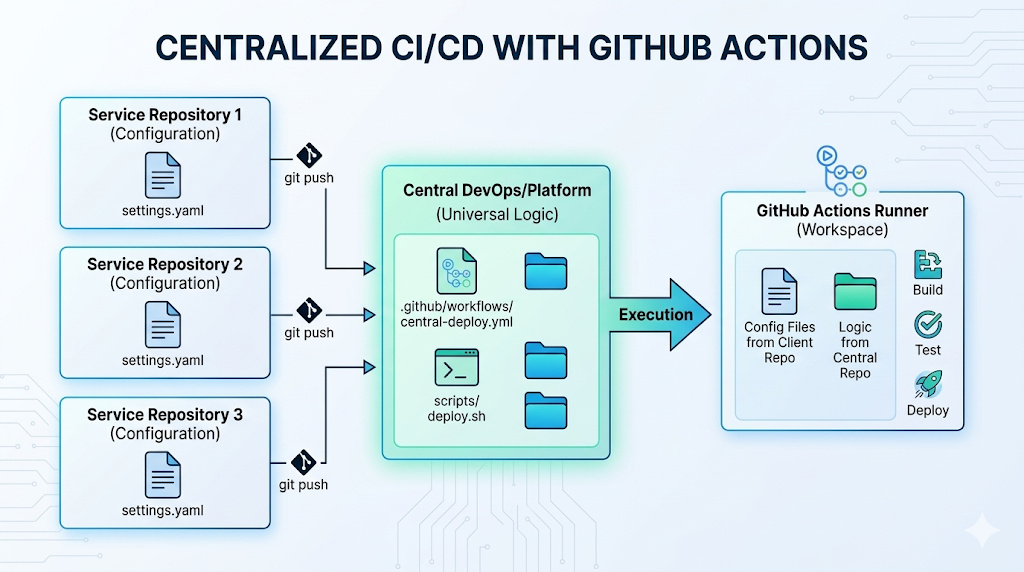
Centralization. GitHub Actions provides awesome but often underutilized capability. we can store all of the code, deployment logic, bash scripts, and GitHub workflow definitions in one single, centralized repository.
Other repositories — which now act purely as configuration sources providing unique settings, environment variables, and inputs.
When a configuration repository triggers a run, GitHub dynamically pulls the scripts from centralized repository into the runner’s workspace. We get a single source of truth for our infrastructure, while our service teams get a plug-and-play deployment experience where they only manage their specific inputs.
The Architecture Overview
To demonstrate this, we will set up the following environment:
- platform-devops-hub (Deployment Source): This repository is owned by the platform team. It contains the master deployment scripts and the reusable GitHub Actions workflow. It holds all the "how-to" logic.
- client-config-alpha (Input Source 1): A repository that provides the specific settings needed to deploy to the US region.
- client-config-beta (Input Source 2): A completely separate repository that provides the exact settings needed to deploy to the EU region.
Both configuration sources will trigger the exact same centralized workflow, but the centralized logic will dynamically adapt based on the specific inputs provided by each client.
Step 1: Create PAT
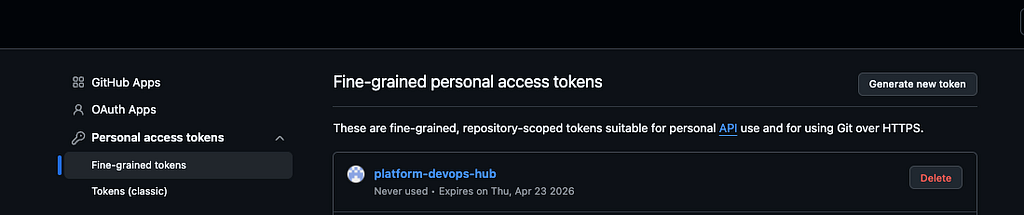
Because these repositories are private, they cannot talk to each other by default. We must create github PAT
Create a Fine-Grained Personal Access Token (PAT):
- Generate a PAT restricted to only the platform-devops-hub repository.
- navigate to user navigation menu -> Settings -> Developer settings -> Personal access tokens -> fined graned tokens -> generate new token
- Grant it Read-only access to Contents.
- Save this token as a Repository Secret named PLATFORM_REPO_TOKEN inside both client-config-alpha and client-config-beta.
Allow reusable workflows from platform-devops-hub
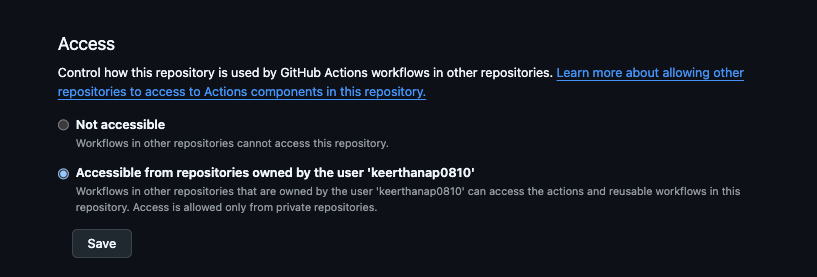
- In the platform-devops-hub repository, go to Settings > Actions > General.
- Scroll down to Access and select “Accessible from repositories owned by user/organization…”
- Save. This allows the client workflows to physically “see” our reusable workflow.
Step 2: Building the Centralized Repo
First, create the master script that will handle the deployment for any service. Notice how this script is designed to look for a settings.yaml file that will eventually be provided by the configuration repositories.
File: scripts/deploy.sh
#!/bin/bash

echo "Centralized Deployment"

# The script looks for settings.yaml in the root (where the configuration repo will be)
if [ ! -f "./settings.yaml" ]; then
  echo "ERROR: No settings.yaml provided by the configuration repository."
  exit 1
fi

# Extract variables provided by the specific configuration source
REPO_NAME=$(grep "repo_name:" ./settings.yaml | awk -F'"' '{print $2}')
TARGET_REGION=$(grep "target_region:" ./settings.yaml | awk -F'"' '{print $2}')

echo "Configuration loaded successfully."
echo "Deploying [$REPO_NAME] to region [$TARGET_REGION]..."

echo "Deployment complete!"
echo "========================================"
Next, create the Reusable Workflow. This workflow performs a powerful “double checkout”: it pulls the client’s settings into the main folder, and pulls central repo’s scripts into a subfolder.
File: .github/workflows/central-deploy.yml
name: Central Deployment Pipeline

on:
  workflow_call:
    secrets:
      PLATFORM_REPO_TOKEN:
        required: true

jobs:
  execute-deployment:
    runs-on: ubuntu-latest
    steps:
      # Checkout the Configuration Source (puts settings.yaml in the root)
      - name: Checkout Client Settings
        uses: actions/checkout@v4

      # Checkout the Central Repo
      - name: Checkout Central Repo
        uses: actions/checkout@v4
        with:
          repository: <owner>/platform-devops-hub
          path: platform-devops-hub
          token: ${{ secrets.PLATFORM_REPO_TOKEN }}

      # 3. Execute the shared logic
      - name: Run Deployment
        run: |
          chmod +x ./platform-devops-hub/scripts/deploy.sh
          ./platform-devops-hub/scripts/deploy.sh
Step 3: Setting up the Configuration Sources
Service teams barely have to write any CI/CD code. They simply provide their configuration and call the central repo
Configuration Source 1: client-config-alpha
This team needs a deployment to the US. They create their settings file in their repository root:
File: settings.yaml (in client-config-alpha)
repo_name: "Alpha Repo"
target_region: "us-east-1"
Create a workflow to call the central repo reusable workflow, passing their secret token:
File: .github/workflows/deploy.yml (in client-config-alpha)
name: Deploy Alpha Service
on:
  push:
    branches: [ "main" ]
jobs:
  call-hub:
    uses: <owner>/platform-devops-hub/.github/workflows/central-deploy.yml@main
    secrets: inherit
Runner Workspace for client-config-alpha
/home/runner/work/client-config-alpha/client-config-alpha/ (Workspace Root)
│
├── .github/
│   └── workflows/
│       └── deploy.yml             <-- (Alpha's caller workflow)
│
├── settings.yaml                  <-- (Alpha's config: region "us-east-1")
│
└── platform-devops-hub/                <-- (The Central Logic Hub)
    ├── .github/
    │   └── workflows/
    │       └── central-deploy.yml <-- (The reusable workflow)
    │
    └── scripts/
        └── deploy.sh              <-- (The universal deployment script)
— — — — — — — — — — — — — — — — — — — — — — — — — — — — — — — — — — — — — —
Configuration Source 2: client-config-beta
This team manages a service going to Europe. Their setup is identical, just providing different inputs.
File: settings.yaml (in client-config-beta)
repo_name: "Beta Repo"
target_region: "eu-central-1"
Their workflow file (.github/workflows/deploy.yml) is an exact copy of Alpha's, simply pointing to the same central repo.
name: Deploy Beta Service
on:
  push:
    branches: [ "main" ]
jobs:
  call-hub:
    uses: <owner>/platform-devops-hub/.github/workflows/central-deploy.yml@main
    secrets: inherit
Runner Workspace for client-config-beta
/home/runner/work/client-config-beta/client-config-beta/ (Workspace Root)
│
├── .github/
│   └── workflows/
│       └── deploy.yml             <-- (Beta's caller workflow)
│
├── settings.yaml                  <-- (Beta's config: region "eu-central-1")
│
└── platform-devops-hub/                <-- (The Central Logic Hub)
    ├── .github/
    │   └── workflows/
    │       └── central-deploy.yml <-- (The reusable workflow)
    │
    └── scripts/
        └── deploy.sh              <-- (The universal deployment script)
Moment of Truth
When we push code to client-config-alpha, GitHub provisions a runner.
- The runner assumes the identity of client-config-alpha.
- It downloads client-config-alpha's files (including its specific settings.yaml) into the root directory.
- It uses the secret token to securely reach into platform-devops-hub and download the universal deploy.sh script into a subfolder.
- The central script executes, reading Alpha’s settings.yaml, and dynamically deploys to us-east-1.
trigger client-config-beta, the exact same centralized code will execute, but it will read Beta's settings.yaml and deploy to eu-central-1.
Why This is a Game Changer
By adopting this centralized pattern, we achieve:
- Single Source of Truth: If we need to update our deployment script to support a new cloud provider, we change one file in platform-devops-hub. All configuration sources instantly inherit the update.
- Strict Security: bake security scanners and compliance checks into the central workflow. The configuration repositories cannot bypass them.
- Our teams don’t need to learn complex bash scripting or advanced GitHub Actions syntax. They just write a YAML configuration file and focus on their actual service.
By centralizing your CI/CD logic, you are doing much more than just cleaning up your codebase. You are giving your platform team the peace of mind that security and compliance are handled universally.
It takes a little bit of upfront work to set up those access tokens and reusable workflows, but you DRY !!!
Happy automating!
Comments (0)
No comments yet. Be the first.