Running Your Own Nameserver: CoreDNS + Traefik on a Hetzner VPS
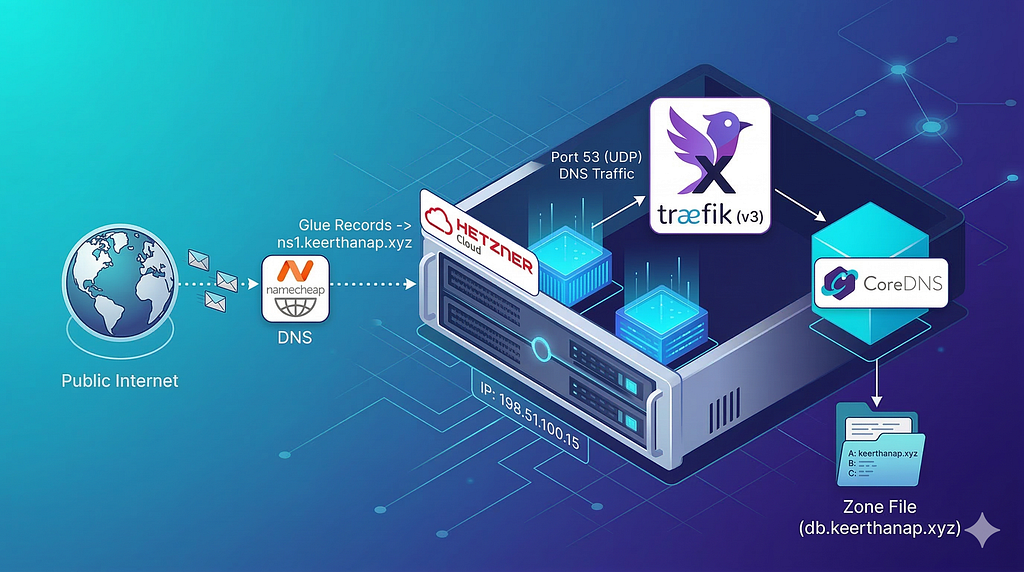
Why self-host your nameserver?
When most people buy a domain, they point it to their registrar’s default nameservers or route it through Cloudflare. But if you are building a self-hosted infrastructure from scratch, we should try something new.
Lets build our own nameserver.
I recently purchased a bare-metal VPS from Hetzner and a domain (keerthanap.xyz) from Namecheap. Instead of relying on external DNS providers, I did run my own nameserver using CoreDNS, sitting securely behind a Traefik reverse proxy.
If you want complete control over your traffic routing and DNS resolution, continue reading :)
1. The Infrastructure: Hetzner & Namecheap
The first step was acquiring the real estate. Spun up a Hetzner VPS, which gave me server’s public IP address.
Next, bought keerthanap.xyz domain from Namecheap. Now Mention top-level domain (TLD) registry where nameservers physically live which is ns1.keerthanap.xyz and ns2.keerthanap.xyz
But wait — Namecheap also needs to know what IP those hostnames resolve to. That’s what glue records are for. In the Namecheap advanced DNS dashboard, Registered custom nameservers and pointed them directly to server’s public IP:
ns1.keerthanap.xyz. -> 204.168.138.156
ns2.keerthanap.xyz. -> 204.168.138.156
This breaks the chicken-and-egg problem: the registry hardcodes these IPs alongside NS delegation so resolvers can bootstrap the chain of trust.
You might have noticed I pointed both ns1 and ns2 to the exact same IP. In a higher environment, good practice is to have at least two different physical servers for your nameservers to provide a fallback if one goes down. Since I have single Hetzner VPS to start, I am using the same IP for both. Setting up true HA for DNS is a project for another day!
Once those records propagated, 204.168.138.156 is officially responsible for answering any DNS queries for keerthanap.xyz.
2. Crafting the CoreDNS Zone File
Now that the internet was sending DNS queries to my server, we needed a service to actually answer them. Enter CoreDNS, a fast, flexible DNS server written in Go (used in k8s, just bragging for choosing coredns).
Created a custom zone file that mapped subdomains to 204.168.138.156 /etc/coredns/db.keerthanap.xyz contains
keerthanap.xyz. 3600 IN SOA ns1.keerthanap.xyz. admin.keerthanap.xyz. (
    2026031401  ; Serial
    7200        ; Refresh
    3600        ; Retry
    1209600     ; Expire
    3600        ; Minimum TTL
)
keerthanap.xyz. 3600 IN NS ns1.keerthanap.xyz.
keerthanap.xyz.           3600 IN A 204.168.138.156
ns1.keerthanap.xyz.       3600 IN A 204.168.138.156
ns2.keerthanap.xyz.       3600 IN A 204.168.138.156
server.keerthanap.xyz.    3600 IN A 204.168.138.156
portfolio.keerthanap.xyz. 3600 IN A 204.168.138.156
Increment the serial number every time you change the zone file. Secondary resolvers use it to detect changes and refresh their cache.
Corefile to load this specific zone into CoreDNS:
keerthanap.xyz {
    file /etc/coredns/db.keerthanap.xyz
    log
    errors
}
3. Routing DNS Traffic with Traefik
CoreDNS is not exposed directly to the wild. Used Traefik is the reverse proxy sitting in front of everything. It handles inbound HTTPS on port 443 and also forwards UDP port 53 to CoreDNS.
services:
  traefik:
    image: traefik:v3.6.10
    container_name: traefik
    command:
      - "--providers.docker=true"
      - "--providers.docker.exposedbydefault=false"
      - "--entrypoints.websecure.address=:443"
      - "--entrypoints.dns-udp.address=:53/udp"
    ports:
      - "53:53/udp"   # DNS
      - "443:443"     # HTTPS
      - "8080:8080"   # Traefik dashboard
    volumes:
      - "/var/run/docker.sock:/var/run/docker.sock:ro"
      - "/mnt/data/traefik/data:/data"
    networks:
      - traefik-proxy
    restart: unless-stopped

networks:
  traefik-proxy:
    external: true
Putting it all together
The flow when someone visits portfolio.keerthanap.xyz:
- Their recursive resolver queries the .xyz TLD, which returns Namecheap-registered NS glue: ns1.keerthanap.xyz → 204.168.138.156
- Resolver queries CoreDNS on UDP port 53 at that IP
- Traefik receives the UDP packet on its dns-udp entrypoint and passes it to CoreDNS
- CoreDNS reads the zone file and returns the A record
- Browser connects to 204.168.138.156:443, which Traefik handles and routes to the right container
What you can do when you own Nameserver
Most interesting part is here. Running CoreDNS — directly on the host — means you can go far beyond just serving A records.
Geo-based routing: different IPs for different regions
With the geoip plugin and a MaxMind GeoLite2 database, CoreDNS can inspect the source IP of the DNS query and return different A records depending on where the request is coming from. A user in Asia gets your Singapore server IP; a user in Europe gets your Frankfurt IP.
keerthanap.xyz {
    geoip /etc/coredns/GeoLite2-City.mmdb
    template IN A {
        match "^keerthanap\\.xyz\\.$"
        answer "{{ if eq .Geo.Country.ISOCode \"IN\" }}keerthanap.xyz. 60 IN A 65.21.1.1
               {{ else }}keerthanap.xyz. 60 IN A 95.217.1.1{{ end }}"
    }
}
If you run CoreDNS in Docker, make sure you pass --net=host or use a host-mode network for the container — otherwise Docker NAT replaces the client IP with the gateway IP and geo-routing breaks completely.
Blocking Cloudflare DNS and other resolvers
Since CoreDNS sees the source IP of whoever is querying it, you can drop or redirect queries from specific IPs. cloudflare’s public DNS resolvers 1.1.1.1 . You can refuse them with the acl plugin:
keerthanap.xyz {
    acl {
        # Blocking Cloudflare's published IPv4 ranges (to force ECS)
        block type ANY net 173.245.48.0/20
        block type ANY net 103.21.244.0/22
        block type ANY net 103.22.200.0/22
        ...

        allow
    }
    file /etc/coredns/db.keerthanap.xyz
    log
    errors
}
Instead of refusing, use the rewrite plugin to return a fake IP pointing to a custom "you've been blocked" page whenever Google DNS asks about your domain. Pure chaos.
But actually Why do we need to block any DNS Resolver? here is the reason
My friend Rohit does it for fun, and then he got a real reason to tell.
EDNS Client Subnet (ECS) is a DNS feature where the resolver passes along a small chunk of the user’s real IP address to your server so you can see where they are geographically located.
Google DNS (8.8.8.8) actually passes ECS data. They share the user’s /24 subnet, so GeoDNS works perfectly fine with Google.
Cloudflare (1.1.1.1) refuse to pass ECS data in the name of user privacy. Because they hide the client details, your server only sees Cloudflare’s IP, which completely breaks geographic routing. In fact, websites like archive.today famously blocked Cloudflare’s DNS for this exact reason!
Rate limiting
The ratelimit plugin lets you cap how many queries per second a single source IP can make.
keerthanap.xyz {
    ratelimit 100          # max 100 queries/sec per IP
    file /etc/coredns/db.keerthanap.xyz
}
Find More interesting plugins here coredns.io/plugins, community supported plugins coredns.io/explugins
Now its time for you to host your nameserver, and explore
Reference:
https://www.namecheap.com/support/knowledgebase/article.aspx/768/10/how-do-i-register-personal-nameservers-for-my-domain/
https://doc.traefik.io/traefik/routing/entrypoints/
https://coredns.io/
https://coredns.io/plugins
https://datatracker.ietf.org/doc/html/rfc7871
Comments (0)
No comments yet. Be the first.